What is it?
Tinycircleslider is a circular slider / carousel. That was built to provide webdevelopers with a cool but subtle alternative to all those standard carousels. Tiny Circleslider can blend in on any wepage. It was built using the javascript jQuery library.
Features
- IOS and Android support.
- AMD, Node, requirejs and commonjs support.
- Supports sliding by thumb or pager
- A interval can be set to slide automaticaly every given milliseconds
- Can be set to snap to a page
- Option to fade dots when dragging is done
- Size(radius) of the slider can be set.
- Can fire a callback after every move.
- Easy customizable
- Lightweight
- Source is on GitHub
Need support or custom features?
Anything is possible! For a small fee i can help you implement the script in your project. Missing any features? I can build them for you!!
Examples















$(document).ready(function()
{
    $('#circleslider1').tinycircleslider();
});
$(document).ready(function()
{
    $("#circleslider2").tinycircleslider({
        interval : true
    ,   dotsSnap : true
    });
});





Note: There is no lightbox natively in tiny circleslider for this example fancybox was used.
$(document).ready(function()
{
    $("#circleslider3").tinycircleslider({
        dotsSnap : true
    ,   radius   : 170
    ,   dotsHide : false
    });

    $("#circleslider3").find("a").fancybox();

});





To get a better understanding of how it all comes together I made a (corny) styled example. If someone can make a nicer design it would be greatly appreciated :)
$(document).ready(function()
{
    $("#circleslider4").tinycircleslider({
        dotsSnap : true
    ,   radius   : 215
    ,   dotsHide : false
    ,   interval : true
    });
});
Constructor
tinycircleslider
(
options,
)
|
Properties
| _defaults | Object private |
Default: defaults |
| _name | String private final |
Default: 'tinycircleslider' |
| angleCurrent | Number |
The current angle in degrees Default: 0 |
| dots | Array |
When dotsSnap is enabled every slide has a corresponding dot. Default: [] |
| intervalActive | Boolean |
If the interval is running the value will be true. Default: false |
| options | Object |
The options of the carousel extend with the defaults. Default: defaults |
| slideCurrent | Number |
The index of the current slide. Default: 0 |
| slidesTotal | Number |
The number of slides the slider is currently aware of. Default: 0 |
Methods
_drag
(
event,
)
|
_endDrag
(
event,
)
|
_findClosestSlide
(
angle,
)
|
_findShortestPath
(
angleA,
angleB,
)
|
|
_initialize
()
|
_page
(
event,
)
|
_sanitizeAngle
(
degrees,
)
|
_setCSS
(
angle,
fireCallback,
)
|
|
_setDots
()
|
|
_setEvents
()
|
|
_setTimer
()
|
_startDrag
(
event,
)
|
_stepMove
(
angleStep,
angleDelta,
stepInterval,
)
|
_toDegrees
(
radians,
)
|
_toRadians
(
degrees,
)
|
|
move
(
index,
)
Move to a specific slide.
|
|
start
()
If the interval is stopped start it. |
|
stop
()
If the interval is running stop it. |
Events
| move |
The move event will trigger when the carousel slides to a new slide. |
Usage
$(document).ready(function()
{
    // Initialize a slider like this.
    //
    var $box = $('#box');
    $box.tinycircleslider();

    // Try this to get access to the actual slider instance.
    //
    var box = $box.data("plugin_tinycircleslider");

    // Now you have access to all the methods and properties.
    //
    // box.start();
    // console.log(box.slideCurrent);
    //
    // etc..

    // You can bind to the move event like this.
    //
    $box.bind("move", function()
    {
        console.log("do something on every move to a new slide");
    });
});
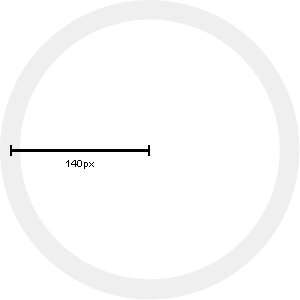
The image below displays how you calculate the radius of your circleslider. The center of your slider to the center of the outside circle is your radius.